Content notice: Articles and other contributed content reflect the views and information provided by their individual authors or contributors. Publication by FITNI does not necessarily constitute endorsement of those views. Responsibility for the accuracy of contributed content remains with the original author or contributor.
📝 Article
DRY: Don't Repeat Yourself
By Dave Milliken
There's a moment I've seen play out in a classroom more times than I can count. A student is debugging an assignment, they find the bug, they fix it, they run the program again... and the exact same bug is still there. Nine times out of ten, the reason is that the calculation they just "fixed" exists somewhere else in the code too, copied and pasted with pride, and they only fixed one of the copies. Welcome to the problem that DRY exists to solve.
DRY stands for Don't Repeat Yourself, and it might be the single most useful habit you can build as a programmer, right up there with "save your work" and "read the error message before panicking."
Let's start simple. Suppose we need to calculate the volume of a box:
volume = length x width x height
If we only need that calculation once in our program, fine, no harm done. But suppose we need it in three different places, and being efficient (or lazy, the line is thinner than we'd like to admit), we write it out three times. Everything works. Everyone's happy. Then, a week later, the requirement changes. Maybe we now need to add a tolerance of 2 units:
volume = (length x width x height) + 2
Now we have to go and find all three copies and update every single one. And here's where it goes wrong: we forget one. Or we update it slightly differently in one place than another. Or, best of all, one of the three copies already had a bug in it that nobody noticed, and now we've got three different versions of "correct," none of which agree with each other.
The fix is almost embarrassingly simple: write the calculation once, in a function, and have every part of the program call that one function. Change the calculation, and you change it in one place. That's it. That's the whole principle. Everything else is just working out the implications.
It's not just good manners, it's measurable
I could leave DRY there as a nice piece of programming folklore, the kind of thing a lecturer says and everyone nods along to. But it's worth knowing this isn't just an opinion dressed up as a rule. People have actually gone and measured it.
Researchers studying what's called "code cloning" (which is the polite technical term for what the rest of us call copy-paste programming) have found that duplicated code isn't rare. Depending on the study, somewhere between 5% and 20% of a typical large codebase turns out to be duplicated, and some individual systems come in a lot higher than that. More tellingly, several studies comparing duplicated code against original code have found that the duplicated stuff is more likely to contain bugs, and more likely to need fixing again later. Which, if you think about it for two seconds, makes complete sense: fix a bug in one copy, and every other copy is still quietly broken, just waiting for someone to notice.
And here's the part that should really get your attention if you're the type who likes a good return on investment. Across decades of research into software costs, estimates consistently put the maintenance phase, everything that happens after the software is first written and working, at somewhere between 60% and 90% of the total cost of that software over its lifetime. Not the fun part where you build the thing. The unglamorous bit afterwards, where someone has to go back in and change it. DRY is one of the more effective, and cheapest, ways of keeping that bill down, because it shrinks the number of places a future change has to be made correctly.
Constants deserve the same treatment
The same idea applies to values, not just calculations. If your code needs pi, don't type 3.14159 in six different places. Give it a name:
PI = 3.14159
Now use PI everywhere you need it. Same goes for anything else that shows up repeatedly, the golden ratio, a tax rate, a maximum file size, whatever it is. There are two payoffs here. First, PI or GOLDEN_RATIO tells the next person reading your code far more than a bare number ever could. Second, when that value inevitably needs to change, you're changing it once, not hunting through your entire project hoping you've caught every instance.
Why this matters more than it looks like it does
When we're first writing a program, we're focused on one thing: getting it to work. That's natural. But here's an uncomfortable truth: software spends far more of its life being maintained than it ever spends being written. Someone will need to fix a bug six months from now. Someone will need to bolt on a new feature. Someone will need to figure out why a particular decision was made in the first place, and that someone might well be you, except six-months-from-now you has absolutely no memory of what today-you was thinking. I've been that person. We've all been that person.
There's a piece of advice, only half a joke, that gets passed around in software circles: write your code as though the person who has to maintain it is a psychopath who knows where you live. It's funny because it's true. Clear code, sensible names, and a serious effort to avoid duplication all make software easier to read, easier to change, and easier to fix, and given that maintenance is where most of the time and money genuinely goes, that's not a small thing to get right.
A word of caution: don't take it too far
Like most good programming advice, DRY can be overdone. Two bits of code that happen to look similar are not automatically the same thing, and forcing them together just to avoid a bit of repetition can leave you with something far more tangled and confusing than the duplication ever was. Even the research on code cloning makes this point: not all duplication is equally harmful, and clumsy attempts to remove it can create new problems of their own.
A decent test to apply is this: if this rule, value, or calculation changes, would I expect every copy of it to change together? If yes, it probably belongs in one place. If no, if the two pieces of code just happen to look alike today but represent genuinely different ideas, leave them alone. Chasing an arbitrary "no duplication" score is a great way to make your code worse while feeling very virtuous about it.
The bottom line
DRY is really about having a single source of truth. One calculation, one place. One constant, one place. One rule, one place. Less duplication means fewer places for bugs to hide and less work every time something changes, and given that "something changes" describes most of what actually happens to software over its lifetime, that's not a minor convenience. It's the difference between a codebase you can work with in five years and one you're afraid to touch.
Further reading
Clean Code: A Handbook of Agile Software Craftsmanship, by Robert C. Martin, is worth your time if you want to go deeper into what separates code that merely works from code other people can actually maintain. You don't need to agree with every single rule in it, its real value is that it gets you thinking about the poor soul who has to read your code after you've moved on.
Scrum: The Art of Doing Twice the Work in Half the Time, by Jeff Sutherland and J. J. Sutherland, isn't a programming book at all, but its ideas about building things in small, testable stages rather than trying to design the perfect system upfront apply directly to why code needs to stay maintainable. Requirements change. People change their minds. DRY is one small but genuinely useful part of surviving that.
📝 Article
CRUD: The Four Operations Behind Most Applications
By Dave Milliken
Here's a fun bit of trivia before we even get started: the word "crud" has been in use since before computers existed in any form we'd recognise. Nuclear engineers working on the Manhattan Project used it in the 1940s to describe the radioactive gunk that built up inside reactor coolant systems. So when the acronym Create, Read, Update, Delete came along decades later, it wasn't invented to fit the word, the word already existed and the acronym just happened to land on top of it. Which feels about right, because CRUD is one of those ideas that sounds unglamorous and slightly grubby, right up until you realise it's quietly running almost everything you touch on a screen.
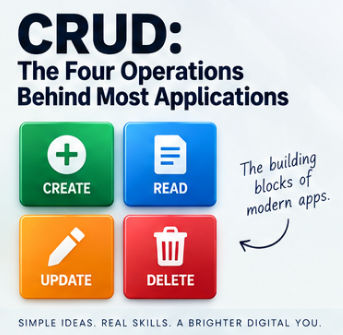
CRUD stands for Create, Read, Update, and Delete, four operations that, once you learn to spot them, you will start seeing absolutely everywhere. The term got popularised properly in 1983, in James Martin's book Managing the Data-base Environment, and it sounds like it belongs firmly in database-textbook territory. It does. But it also belongs in your phone, your game console, your banking app, and pretty much anything else with a save button.
Create: making something that didn't exist before
Create just means bringing something new into existence. A new customer record in a database. A new post on social media. A new product on a shop's website. A new save file the moment you start a game for the first time. Different contexts, same underlying move: before, it didn't exist; after, it does.
Read: getting information back out
Read means retrieving or viewing something that already exists, without changing it. Opening a customer's record to check their details. Scrolling past a friend's post. Loading a saved game so it picks up exactly where you left off. Even something as mundane as opening a settings screen is, underneath, a read operation: the software is fetching something it already stored and showing it to you.
Update: changing something that's already there
Update means altering something that already exists rather than creating something new. A customer changes their phone number, the record updates. You edit a post, it updates. You swap your profile picture, your profile updates. Games do this constantly and rather more dramatically. Start a game and your save file might read Health: 100, Level: 1, Gold: 20. Play for an hour, and it becomes Health: 75, Level: 2, Gold: 140. Same save file, same slot, completely different contents. That's an update: the record persists, but what's inside it has moved on.
Delete: taking something away
Delete means removing something that already exists. Delete a customer, and the record's gone. Delete a post, and it disappears from the feed. Delete a saved game, and that save no longer shows up when you go looking for it. Straightforward enough on the surface, though, as I'll come back to in a moment, "deleted" doesn't always mean what you'd assume it means.
Why this shows up literally everywhere
Take a game. You start a new game: that's a create. The next day you hit "continue" and it reads your saved progress. You play for an hour, pick up some gear, finish a mission, and the game updates your save behind the scenes without you giving it a second thought. Eventually you get bored of that character and delete the save to free up space. Four operations, and the player never sees a database, a table, or a single line of code.
Swap the game for social media and nothing about the underlying pattern changes. You create a post, read other people's posts, update your bio or edit a caption you regret, and delete something you posted at two in the morning that seemed funnier at the time. Swap it again for a booking system: create a booking, read it back to check the details, update the date when your plans change, delete it when you cancel. Swap it for a product catalogue, an employee database, a library system, a hospital's patient records, it doesn't matter. The subject changes. The four verbs underneath it do not.
Why this is actually useful, not just trivia
The reason CRUD earns its place in a lesson rather than staying a bit of pub-quiz etymology is that it gives you, the person about to build something, an instant checklist. Someone asks you to build a system for managing library books. Before you write a single line of code, you can ask: can I add a book, can I look one up, can I change its details, can I remove it? Answer those four questions and you've already sketched the skeleton of the whole system. Swap "book" for customer, invoice, appointment, vehicle, student record, or almost any noun your employer cares about, and the same four questions still do the job. That's a genuinely useful starting point, and it costs you nothing to ask.
Delete doesn't always mean destroyed
Here's the part that trips people up, including plenty of professionals who really ought to know better. The D in CRUD stands for delete, but real systems very often don't actually destroy the data. Instead, they mark it as inactive, archived, or hidden, while quietly keeping it in storage. This is usually called a soft delete, as opposed to a hard delete, which really does remove it.
There are good reasons for this. An employee who's left the company might still be linked to old payroll records, project history, or training records that the organisation is legally required to keep. A cancelled booking might still matter for financial reporting. A "deleted" social media post might need to survive somewhere for moderation or legal reasons even after it's vanished from public view.
This isn't just tidy database design, it's often a genuine legal requirement, and getting it wrong can be expensive. Under GDPR, for instance, organisations are generally required to properly erase someone's personal data on request, typically within a month, and the fines for getting this wrong are not symbolic: they can run into the tens of millions of euros. At the same time, the same regulations often require organisations to retain other records, invoices, fraud investigations, audit trails, for years afterwards. So the honest answer to "does delete mean it's actually gone?" is: it depends entirely on what's being deleted, and why, and that tension between erasing someone's data and being legally obliged to keep other data nearby is a real design problem, not an academic one.
The important part
CRUD isn't a programming language, a specific database, or a piece of software you can install. It's simply a name for four operations that keep reappearing across almost every kind of system humans have ever built to manage information: create something, read something, update something, delete something. Once you start looking for those four verbs, you'll find them in databases, websites, games, mobile apps, social media platforms, and business software, usually all four, usually all in the same afternoon. It might have an unglamorous, faintly nuclear-reactor-adjacent name, but CRUD describes one of the most genuinely useful patterns in the whole of software development.
Further reading
Clean Code: A Handbook of Agile Software Craftsmanship, by Robert C. Martin, isn't specifically about CRUD, but it's a strong guide to structuring software so that these everyday operations, creating, reading, updating, deleting, stay readable and easy to change rather than turning into a tangle six months down the line.
Database Design for Mere Mortals, by Michael J. Hernandez, is a solid starting point for thinking about how information should actually be organised before your software starts creating, reading, updating, and deleting it. The specific technology will keep changing. The four operations underneath it, so far, have not.
📝 Article
What Is an Algorithm?
By Dave Milliken
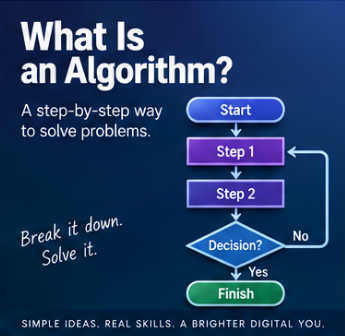
The word "algorithm" gets thrown around as though it belongs exclusively to Silicon Valley boardrooms and slightly ominous news articles. It doesn't. At its simplest, an algorithm is just a sequence of instructions designed to achieve a particular result. That result might be making a cup of tea. It might be working out an employee's wages. Or it might be deciding which video a few hundred million people see next. The scale changes enormously. The underlying idea does not change at all.
Let's start with the tea
The easiest way into this is, genuinely, a cup of tea. A first attempt at an algorithm for making one might look like this: boil the water, put a teabag in the cup, add the hot water, let it brew, remove the teabag, add milk, add sugar, stir, serve. That's already an algorithm, a set of steps that, followed in order, reliably produces a result.
The trouble is that not everyone wants the same cup of tea. Some people want it strong, some weak, some with two sugars, some with none, some drowning in milk and some barely touched by it. So we make the algorithm more flexible. Instead of hard-coding "add two teaspoons of sugar," we ask how many are wanted and add that amount instead. Instead of fixing the brewing time at exactly three minutes, we let it vary depending on how strong the drinker likes it. The algorithm can now produce a huge range of different cups of tea while following exactly the same underlying process.
Inputs are what make one algorithm produce many different results
This gets us to something genuinely important: inputs. Our tea algorithm might take in strength, amount of milk, number of sugars, and cup size, and use those to decide what actually happens. Feed it "no sugar, a splash of milk, strong," and you get one cup. Feed it "two sugars, a lot of milk, weak," and you get a completely different one, without the algorithm itself changing at all. Only the information going into it has changed. This is a large part of why algorithms are so useful in the first place: design the process once, and you can reuse it for an almost unlimited number of different situations just by varying what you feed it.
Algorithms make decisions too
An algorithm isn't limited to a fixed sequence of steps, it can also branch depending on circumstances. Our tea algorithm might contain a rule along the lines of "if sugar is required, add sugar, otherwise don't," or "if strong tea has been requested, brew for longer." None of this means the kettle is thinking. It just means we've given the process rules for what to do under different conditions, and those rules can be as simple as a sugar preference or as elaborate as an entire tax system.
A slightly more serious example: wages
Let's move somewhere with real consequences if it goes wrong: payroll. A very simple version might just be hours worked multiplied by hourly rate, so 35 hours at £15 an hour comes to £525. Real payroll almost never stays that simple for long, because standard hours, overtime, holiday pay, tax, pension contributions, other deductions, and bonuses all start piling on. The algorithm ends up containing rules such as "if hours worked exceed 40, pay the extra at the overtime rate," followed by whatever logic calculates deductions and allowances before landing on a final net figure. It's a lot more complicated than making tea, but it's exactly the same shape underneath: information goes in, rules get applied, a result comes out.
Input, process, output
A huge amount of software can be understood through exactly that three-part shape: input, process, output. For the tea, the input is strength, sugar, and milk preference, the process is boiling, brewing, adding, and stirring, and the output is one cup of tea. For payroll, the input is hours worked, hourly rate, and tax information, the process calculates pay and deductions, and the output is the net wage. Learning to spot these three stages is one of the quickest ways to make sense of what a piece of software is actually doing.
Algorithms didn't start with computers
None of this is unique to programming. A recipe is an algorithm. So are flat-pack furniture instructions, a pre-flight checklist, and directions from one place to another. What makes algorithms particularly important in computing is that computers need instructions they can follow with total consistency, because a computer doesn't know what you meant, only what you actually told it. That gap between "what I meant" and "what I wrote" is where an enormous share of bugs come from, and it's why the quality of the instructions matters so much.
The algorithms that decide what you see next
At the far end of the complexity scale sit the recommendation algorithms behind platforms like YouTube, TikTok, and Facebook. Underneath a genuinely enormous amount of engineering, the basic question they're trying to answer is disarmingly simple: what should we show this person next? To answer it, the system considers signals like what you've previously watched, what you clicked, what you scrolled straight past, how long you actually stayed on something, and what similar users engaged with. All of that gets processed, and out comes a decision: show this next. It might involve machine-learning models and vast amounts of data rather than a kettle and a teabag, but it's still, underneath everything, information going in, a process being applied, and a result coming out.
An algorithm is not magic
People talk about "the algorithm" the way earlier generations talked about fate: "the algorithm recommended it," "the algorithm decided what I'd see," as though some autonomous force had made a judgement call. It hadn't. An algorithm is a process built by people. Someone chose what information it should consider. Someone decided what it was actually trying to achieve, more watch time, more engagement, more accurate wage calculations, whatever the goal happens to be. Someone designed the rules or trained the model that turns inputs into outputs. Modern algorithms, especially the machine-learning kind, can get extraordinarily complex, but complexity isn't the same thing as mystery. There's still a process connecting what went in to what came out, even when that process is hard for a human to fully trace.
Good algorithms need good instructions, and bad ones can be very expensive
An algorithm is only as good as the thinking behind it, and when that thinking is wrong, or a safeguard is missing, the consequences can be immediate and severe. On the 1st of August 2012, Knight Capital, at the time one of the largest trading firms on Wall Street, deployed new trading software to seven of its eight production servers. The eighth server still had an old, dormant piece of code left over from a feature retired years earlier, and a reused flag accidentally reactivated it the moment markets opened. That old algorithm started firing off orders into the market at enormous speed, and because there was no safeguard in place to automatically halt it, nobody caught the problem in time to stop it manually. In about 45 minutes, Knight Capital had executed millions of unintended trades and lost roughly 440 million dollars, close to bankrupting a company that had taken 17 years to build. Nobody hacked them. No market crashed around them. It was simply an algorithm doing exactly what it was told, on a system nobody had properly checked, with no failsafe to catch the mistake before it became catastrophic. It's a genuinely useful reminder that "the algorithm did it" is never really the full story. Somebody wrote it, somebody deployed it, and somebody was responsible for checking it actually worked.
The important part
An algorithm is simply a method for getting from a starting point to a result, whether that's something as modest as making tea, as moderately involved as calculating wages, or as extraordinarily complex as deciding what a billion people see on their phones next. The underlying shape barely changes: input flows into instructions and decisions, which produce an output. Once you start thinking about software as a process rather than as some mysterious black box, algorithms stop being intimidating and start being, frankly, quite ordinary. Computers are extremely good at following instructions. The hard part, now and always, is making sure we're giving them the right ones.
Further reading
Grokking Algorithms, by Aditya Bhargava, introduces common algorithms through diagrams and plain explanations rather than dense mathematical notation, which makes it a good way in if you want to understand the ideas before getting buried in formal proofs.
Think Like a Programmer, by V. Anton Spraul, spends less time on memorising specific algorithms and more on the actual skill underneath all of this: breaking a problem into smaller pieces, spotting patterns, and building a solution up from there. That way of thinking clearly about a problem before writing a single line of code is arguably the most valuable thing any of this teaches you.
📝 Article
Variables Explained Without the Jargon
By Dave Milliken
Every programming course on earth seems to open the topic of variables with some version of "a variable is a named memory location," and every single time, a room full of beginners nods politely while understanding absolutely nothing. It's technically true. It's also about as useful as explaining what a car is by describing the metallurgy of the engine block. So let's start somewhere that actually helps.
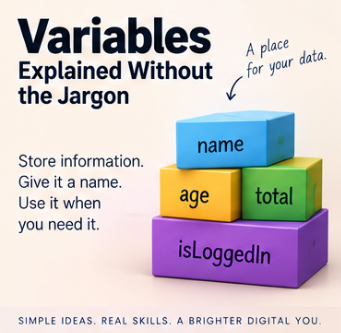
A variable is a way of giving a name to some information your program needs to remember. That's it. That's the whole idea, before anyone starts dressing it up.
age = 25
name = "Alex"
temperature = 18.5
logged_in = true
Here, age, name, temperature, and logged_in are just names, ways of referring to a piece of information without having to retype the information itself every time. Simple as that sounds, this one idea sits underneath almost everything a program ever does.
Think of a variable as a labelled box
The classic mental model, and it's classic because it works, is to picture a variable as a labelled box. Write score = 10, and you can imagine a box labelled score with the number 10 sitting inside it. Write score = 20 later on, and the label hasn't changed, but the contents have. The box now holds 20 instead.
+-------------+
| score |
| 20 |
+-------------+
It's not a perfect description of what's actually happening at the hardware level, but as a starting point, it will get you a very long way, and you can refine it later once you actually need to.
What's really going on: memory
Computers store information in memory, and memory is really just a huge number of locations that can each hold some data. When your program needs to remember something, that something has to live somewhere in memory, at some specific address. A variable is simply a convenient name the programmer gets to use instead of that address. Rather than saying "give me whatever's sitting at memory location 0x7A3F," we get to say customer_name, which is considerably friendlier on a Monday morning.
Exactly how a variable relates to memory underneath the hood depends on the language you're using. Sometimes the variable holds the value directly. Sometimes it holds a reference pointing to where the real value lives. Sometimes the compiler optimises things so thoroughly that the simple picture stops matching reality at all. For the vast majority of programming you'll ever do, though, this is enough: a variable gives you a meaningful way to refer to data your program is working with. Everything else is detail you can pick up as you need it.
Not all information is the same: data types
Here's where it gets interesting. The number 42 and the text "42" might look almost identical sitting on a page, but a computer treats them completely differently. The number can go straight into arithmetic: 42 + 10 = 52. The text can't, not without some conversion first. This distinction is what we call a data type: it tells the computer what kind of information a value represents, and therefore what you're allowed to do with it.
Characters and strings
A character is a single character, a letter, digit, punctuation mark, symbol, or space, anything from 'A' to '7' to '£'. A string is simply a sequence of characters strung together, which is exactly where the name comes from. "Hello" is conceptually just 'H', 'e', 'l', 'l', 'o' lined up in order, and strings can happily contain letters, numbers, spaces, and punctuation together, as in "Order #1047" or "£25.00". Worth flagging early: "25" and 25 are not the same thing. One is text that happens to look numeric. The other is a number you can do maths with. That distinction trips up more beginners than almost anything else on this list.
Integers
An integer is a whole number, with no fractional part: -100, -1, 0, 1, 42, a million, whatever. 12 is an integer. 12.5 is not. Integers are the natural fit for anything you count rather than measure: number of employees, quantity in stock, a score, an age in whole years. Computers typically set aside a fixed amount of space for storing an integer, which means there's usually a smallest and largest value it can hold. Modern languages generally shield you from thinking about this constantly, but the limit is still there, quietly, in the background.
Floating point, and the trouble it causes
This is where things stop being tidy. Fractional numbers like 3.14, 19.95, or -12.75 belong to what mathematicians would call the real numbers, and there are infinitely many of them between any two points on the number line. Computers, unfortunately, only have a finite number of bits to work with, so something has to give. The usual answer is a floating-point representation, which works a bit like scientific notation: 1.23 x 10 cubed represents 1230, with part of the available space used for the significant digits and part used for the scale.
This lets computers represent an enormous range of values efficiently. The catch is that not every decimal value can be stored exactly. Take 1 divided by 3. Mathematically that's 0.333333... going on forever, and a computer has to stop somewhere. Store 0.333333 and multiply it by three, and you get 0.999999, not exactly 1. Binary floating point creates the same kind of trouble even with numbers that look completely ordinary to us: the decimal value 0.1 cannot be represented exactly in standard binary floating point, which is why a calculation that looks like 0.1 + 0.2 in your head can quietly produce something extremely close to, but not precisely, 0.3.
Usually this tiny gap doesn't matter. Occasionally it matters an enormous amount. On the 25th of February 1991, during the Gulf War, a Patriot missile battery at Dhahran in Saudi Arabia failed to track and intercept an incoming Scud missile, which went on to hit an army barracks and kill 28 soldiers. The subsequent investigation traced the failure back to exactly this kind of error: the system tracked time using an integer counting tenths of a second, converted using a 24-bit approximation of 0.1 that wasn't quite exact. After the battery had been running continuously for around 100 hours, that tiny rounding error had accumulated enough to throw the tracking calculation off by roughly a third of a second, more than enough for the missile to slip past. It's an extreme example, most floating-point rounding errors cost you a wrong total on a spreadsheet rather than anything remotely that serious, but it's a genuinely sobering illustration of why "it's only a tiny rounding error" isn't always the reassurance it sounds like.
Which brings us to money
Never casually store money as an ordinary floating-point number. One transaction with an error of a fraction of a penny, nobody notices. A financial system running millions or billions of calculations, and those tiny errors start accumulating, comparisons stop behaving the way you'd expect, and totals quietly fail to reconcile. The standard fix is to use a data type designed for exact decimal arithmetic, or to store the smallest unit as a plain integer. Instead of storing £12.99 as a float, you store 1299 pence and only convert it for display. The right technique depends on your language, but the underlying lesson doesn't: choose your numeric type according to what the number actually represents, not just whatever happens to accept a decimal point. If you want to go deeper on this, Computerphile's video "Floating Point Numbers" covers the mechanics far better than a paragraph like this one ever could.
Boolean values
A Boolean holds one of exactly two states, true or false, and it's the natural fit for anything with a yes-or-no answer: logged_in, email_verified, account_active, payment_received. The name comes from the mathematician George Boole, whose work on logic in the nineteenth century turned out, rather unexpectedly for him, to become the foundation of every digital circuit and every if-statement ever written since.
Dates and times
Dates and times look simple and are, quietly, one of the most reliable sources of bugs in the entire industry. Storing a date as a plain string invites disaster the moment two systems disagree about format: does 03/04/2026 mean the 3rd of April or the 4th of March? A proper date type sidesteps the argument entirely by storing the value as an actual date rather than a collection of characters that merely looks like one. And that's before you've even got to time zones, daylight saving changes, and leap years, which are collectively responsible for more programmer humility than almost any other topic in computing. That's a subject that genuinely deserves its own article.
Null: the value that means "no value"
Null means there is no value here, and it's worth being precise about what that isn't. Null is not the same as 0. It's not the same as an empty string. It's not the same as false. If you're recording a customer's middle name and they don't have one, middle_name = null means "we have no value recorded," while middle_name = "" would mean "a value exists, and it happens to be empty." Those are genuinely different situations, and the distinction matters a lot once you start working with databases, where null-handling rules can vary in ways that catch experienced developers out, never mind beginners.
Mutable and immutable
Two words that sound far more intimidating than they are. Mutable means "can be changed." Immutable means "cannot be changed once it's been created." Write name = "David" and then name = "Dave", and it might look as though the string itself changed. In languages where strings are immutable, that's not actually what happened: "David" is untouched, a brand new string "Dave" was created, and the variable was simply pointed at the new one instead. There's no universal rule for what's mutable and what isn't, it depends entirely on the language and the type, but the concept becomes genuinely important once you start working with objects, arrays, and other structures where "changing something" can mean two quite different things.
A variable and its value aren't always the same thing
When a variable "changes," two different things might be happening. The variable might simply be pointed at a different value, as with score = 10 then score = 20. Or the object the variable refers to might itself be modified in place. This distinction becomes much more important once you get into objects and references, but for now it's enough to know that some of those labelled boxes actually contain directions to somewhere else entirely, rather than the value itself.
Stack and heap, briefly
You'll eventually run into the terms stack and heap, two different ways a running program can organise its memory. You might hear the simplified rule "simple variables go on the stack, objects go on the heap," which is a useful teaching shortcut but genuinely not a universal law, different languages and runtimes manage this differently. For now, knowing the terms exist is enough. They'll matter a great deal more once you start caring about performance and memory management.
Variables aren't just a programming thing
The same ideas turn up well outside programming languages. In code you might see age = 50, name = "Dave", price = 19.99. In a database table, the same concepts appear as column types: name TEXT, age INTEGER, price DECIMAL, active BOOLEAN, date_created DATE. In a spreadsheet, a cell might simply be formatted as Text, Number, Date, or Currency. The concepts transfer across all three. The exact implementation underneath usually doesn't: a spreadsheet's idea of a number, a database's DECIMAL, and a language's floating-point type can all behave slightly differently from one another, even when they look the same on the surface.
Choosing good variable names
A computer is perfectly happy with x = 1500. The person maintaining your code six months from now, quite possibly you, will not be. What does x mean? Compare it with monthly_salary = 1500, which actually tells you something. Swap n = "Dave" for customer_name = "Dave", and p = 29.99 for product_price = 29.99. There's a piece of advice, only half a joke, that gets passed around in software circles: write your code as though the person who has to maintain it is a psychopath who knows where you live. A meaningful variable name might one day save your life. At the very least, it'll save your afternoon.
Naming conventions
Different languages and teams settle on different conventions for names made of several words, and it's worth recognising the main four. camelCase starts lowercase and capitalises each subsequent word: customerName, dateOfBirth. PascalCase capitalises every word, including the first: CustomerName, DateOfBirth, and tends to show up for class names in languages that favour it. snake_case separates words with underscores: customer_name, date_of_birth. kebab-case separates words with hyphens: customer-name, date-of-birth, and turns up constantly in URLs, HTML attributes, and CSS, though most programming languages won't let you use it for an actual variable name, since the hyphen reads as subtraction. There's no universal winner here. The important thing is learning the convention of whatever language or project you're in, and then sticking to it.
A few practical rules
Variable names generally can't start with a number, so 2customers won't fly in most languages, but customer2 will. Some languages reserve particular symbols for particular jobs, PHP variables all start with a dollar sign, for instance, and every language reserves certain words for its own use: if, else, class, return, and while typically can't be reused as variable names because the language already needs them for something else. Always check the specific rules of whatever you're working in.
Good variable names tend to share a few qualities: descriptive enough to explain their purpose, consistent with whatever convention the project already uses, short enough to stay readable, long enough to avoid ambiguity, free of unnecessary abbreviations, and appropriate to the kind of information they hold. a = 47.50 tells you nothing. invoice_total = 47.50 tells you plenty. And the_total_amount_of_the_invoice_before_we_send_it_to_the_customer = 47.50, while technically valid in most languages, is enthusiasm taken slightly too far. Clarity is the actual goal, not length.
Constants: the variables that shouldn't vary
A constant is a named value that isn't meant to change during normal execution: PI = 3.14159265, VAT_RATE = 0.20, MAX_LOGIN_ATTEMPTS = 5. Rather than scattering the same important value across your codebase and hoping you remember every location when it eventually needs updating, you define it once, give it a sensible name, and use that name everywhere. If the value changes, you know exactly where to go.
Choose the type that matches the meaning
Here's the lesson that actually matters most, once you strip away the syntax: choosing a data type isn't just about finding something that can technically hold the value. It's about describing what the value means. Take 07812345678. It's made entirely of digits, but that doesn't make it a number in any useful sense. If it's a phone number, you're never going to add 10 to it, divide it by 2, or calculate its average, so treating it as a number gains you nothing and loses you the leading zero the moment some helpful piece of software decides to "clean it up." The same logic applies to postcodes, account numbers, reference numbers, and most product codes: they might be made of digits, but they're identifiers, not quantities, and they belong in a text field. The question worth asking every time is simple: what am I actually going to do with this value? If the answer involves arithmetic, it's probably numeric. If the answer involves matching or displaying it, it's probably text, whatever it looks like.
Variables are simple, until they aren't
At the beginning, variables are just names attached to values: name = "Dave", age = 50, active = true. From that one small idea, you eventually work outward into memory, data types, references, objects, mutability, precision, the stack and the heap, databases, and type systems generally. You don't need any of that on day one. Start with NAME arrow VALUE, and let your understanding grow as you run into problems that actually require it. That's genuinely how most working programmers learned it, myself very much included.
The important part
Variables let programs remember information and give that information a name worth using. Different kinds of information need different representations: a character holds a single symbol, a string holds a sequence of them, an integer holds a whole number, a float holds an approximate fractional value, a decimal type holds a precise one, a Boolean holds true or false, a date holds a calendar date, and null represents the deliberate absence of a value altogether. The exact names, behaviour, and rules shift from language to language and system to system, which is really just programming's way of reminding you that almost every good answer in this field eventually starts with "it depends." Learn the underlying principle first. Then learn how your particular language happens to implement it.
Further reading
Code: The Hidden Language of Computer Hardware and Software, by Charles Petzold, builds up from genuinely simple ideas about representing information all the way to a real understanding of how computers work underneath. It's an excellent choice if you want to know what's actually happening beneath the syntax rather than just memorising it.
Computer Systems: A Programmer's Perspective, by Randal E. Bryant and David R. O'Hallaron, is considerably more technical, but it's a strong next step once you want to properly understand memory, data representation, and what's really going on with the stack.
Clean Code: A Handbook of Agile Software Craftsmanship, by Robert C. Martin, brings us back to the human side of all this. Its chapters on naming and readability are a good reminder that a variable's name isn't just storage bookkeeping, it's part of how programmers explain a system to each other, including the future version of themselves who's forgotten everything.
And for a short, clear walk through one of the trickier issues covered above, Computerphile's "Floating Point Numbers" is well worth ten minutes of your time.
📝 Article
What Is a Database?
By Dave Milliken
Split the word in two and it stops sounding technical almost immediately: data, base. A home for information. That's genuinely most of the idea. But the word doing the real work here isn't "storage," it's "structure." A shoebox stores receipts. A database organises data so it can be stored, found, changed, compared, filtered, and actually used, which turns out to be a considerably higher bar than just "keeping it somewhere."
From data to information
Before databases, it's worth pausing on the word "data" itself. A common teaching model runs data, through processing, into information. On its own, Dave, 50, Belfast, £25.00 doesn't tell you much, it's just a scatter of values. Give them labels, Name: Dave, Age: 50, Location: Belfast, Price: £25.00, and suddenly they mean something. That's the shift from data into information, and while the line between the two words gets blurry in everyday use, the underlying point holds: raw values become genuinely useful the moment you give them structure and context. That's a large part of what a database is for.
Structure is doing all the work
Hand someone a list like Dave, Belfast, 50, Anne, Lisburn, 42, Michael, Bangor, 37, and they'll eventually puzzle out what it means, but it takes effort. Arrange the exact same information into a table with Name, Location, and Age as columns, and it becomes instantly readable. Nothing about the data changed. What changed was its organisation, and that, more than anything else, is the fundamental job a database does.
Is a spreadsheet secretly a database?
Sort of, up to a point. A spreadsheet with columns for ID, Name, Email, and Active looks remarkably database-like, and you genuinely can add, view, edit, remove, sort, filter, and search rows in it. A table in a Word document can even hold structured data at a basic level. The difference is that a proper database management system is purpose-built around managing data reliably, handling many users at once, protecting it, and keeping it consistent, whereas a spreadsheet is built primarily for calculation and analysis, and a Word table is built primarily for presentation. A spreadsheet can behave like a simple database. A dedicated database gives you a great deal more control than "behaving like" one.
The four things every database spends its life doing
Whatever else a database gets used for, almost all of its daily work boils down to four operations, often shortened to the acronym CRUD: Create, Read, Update, and Delete. A new customer, Sarah Jones, registers, and a record gets created. A staff member searches for her, and the system reads her record back. She changes her email, and the record updates. Eventually her record might be deleted outright, or quietly archived instead, marked as inactive rather than actually removed, which is common practice when other records still depend on it. Whatever a database looks like on the surface, underneath it's almost always some combination of those four things happening, over and over, thousands of times a day.
Records and fields
Most databases organise information into fields and records. A field is one specific piece of information, First Name, Date of Birth, Email Address. A record is a full set of those fields belonging to one particular thing, Sarah, Jones, 14/06/1984, sarah@example.com. Lay several records out in a table and the pattern becomes visual: each column is a field, each row is a record. It's a simple idea, and an enormous amount of real-world software is built directly on top of it.
Why bother with a proper database at all
A spreadsheet is genuinely fine for ten customers. It starts creaking at a thousand, and it falls apart completely somewhere around a hundred thousand, especially the moment more than one person needs to use it at the same time. At real scale you need to search quickly, control who can access what, stop accidental duplication, maintain relationships between different pieces of data, validate what's coming in, support many simultaneous users, back everything up, recover cleanly when something goes wrong, keep everything consistent, and produce actual reports on demand. That entire list is what a proper database system is built to handle, and it's precisely the list a spreadsheet was never designed for.
Asking the data questions
One of the genuinely powerful things a database gives you is the ability to query it, to ask it a question and get an answer back. Show me every customer from Belfast. Show me every order over £500. Show me which employees haven't completed mandatory training yet. How many bookings came in this month. The database searches through everything it holds and hands back exactly the records that match. That's a meaningfully bigger thing than just storing information, it's the difference between a filing cabinet and a filing cabinet that can answer questions.
And that querying ability turns into genuine insight once you start asking the right questions of it: what's our best-selling product, which day brings in the most revenue, which products tend to get bought together, when's the busiest time of day, which customers order most often. A database, used properly, stops being somewhere you put things and starts being something you learn from.
Flat files: the simplest starting point
The simplest approach going is a flat-file database, and a CSV file is the classic example: id,name,email, then one line per record, everything in a single file. For small, simple datasets, this works perfectly well. The trouble starts once you need to track customers, orders, products, payments, and addresses all at once. Cramming everything into one giant file quickly turns into a mess, which is exactly the problem relational databases exist to solve.
Relational databases: splitting things up properly
A relational database keeps related information in separate tables and connects them. A CUSTOMERS table holds CustomerID, Name, and Email. A separate ORDERS table holds OrderID, CustomerID, OrderDate, and Total, with that CustomerID acting as the thread connecting an order back to the person who placed it. Rather than repeating a customer's full details inside every single order, you store the customer once and link everything else to them. This one idea underpins an enormous share of business software, websites, banking systems, booking platforms, and stock management systems, and it's why names like MySQL, PostgreSQL, SQLite, Microsoft SQL Server, Oracle Database, and Microsoft Access come up constantly. They differ in size, cost, and features, but they're all working from broadly the same relational playbook.
Hierarchical databases
A hierarchical database arranges data as a tree, a company containing departments, containing teams, containing employees, each thing sitting beneath its parent. Your own file system works exactly this way, folders inside folders inside folders, which is probably the most familiar hierarchical structure most people interact with daily without ever calling it that.
NoSQL
NoSQL sounds like it should mean "no SQL allowed," and that's a slightly misleading way to think about it. A better read is that NoSQL databases simply don't force everything into the traditional table-and-row model. They might store information as documents, key-value pairs, graphs, or wide-column structures instead, something like a document database holding {"name": "Dave", "location": "Belfast", "active": true} rather than a row in a table. MongoDB is probably the best-known example. None of this makes NoSQL automatically better than a relational database, it solves a different shape of problem, and picking between them is about fit, not superiority.
Where SQL fits in
SQL, said either as the letters or as "sequel," stands for Structured Query Language, and it's the language most relational databases actually speak. Ask conceptually for "every customer from Belfast," and in SQL that becomes something like SELECT * FROM customers WHERE city = 'Belfast'. You don't need to understand the syntax yet, just what SQL is: a language for creating, retrieving, updating, deleting, filtering, joining, and analysing data in a relational database. SQL and CRUD, unsurprisingly, spend an enormous amount of time in each other's company.
The database and the program are not the same thing
Worth saying plainly, because it trips people up early: a programming language like PHP, Python, Java, JavaScript, or C# is not itself a database. The program talks to a separate database system, MySQL, PostgreSQL, SQLite, SQL Server, and the two do genuinely different jobs. A website's PHP handles the application logic, while MySQL stores and manages the actual data underneath it. They work as a pair, but they are not the same thing wearing different names, and that distinction only gets more important as a system grows.
Protecting relationships
Suppose a customer has placed ten orders, and someone deletes that customer without thinking it through. Do the orders vanish too? Do they stay, orphaned, with no record of who placed them? These are exactly the questions database design has to answer up front, and a well-designed database enforces rules that keep relationships like Customer, Order, and Order Item intact, rather than allowing contradictory or meaningless data to quietly pile up.
Why storing things twice always ends up costing you
If Sarah Jones has placed 200 orders, storing her name, email, and address inside every single one of them means that the moment she moves house, you're updating 200 separate records instead of one, and it only takes missing one of them for her deliveries to start going to the wrong address. Store her once, as Customer ID 42, and connect every order back to that single ID, and you're back to maintaining exactly one record. This habit, keeping one piece of information in exactly one place and connecting everything else to it rather than copying it around, is one of the most useful instincts you can build as a programmer or a database designer. Repeat a value in ten places, and you've created ten opportunities for it to quietly disagree with itself.
And the cost of getting this wrong is not small. Estimates vary and the underlying methodology isn't always made fully public, but IBM's widely cited 2016 figure put the annual cost of poor data quality to US businesses alone at somewhere around 3.1 trillion dollars, covering everything from duplicated customer records to staff quietly wasting hours chasing down which version of a record is actually correct. Whatever the exact number really is, the direction of it is not in doubt: badly organised, duplicated data is not a cosmetic problem, it's an expensive one.
More than just a box for storage
A text file can store data. So can a spreadsheet, so can a Word table. A proper database goes further, giving you structuring, searching, updating, connecting, validating, protecting, analysing, and sharing, all as first-class features rather than things you have to bolt on yourself. That's why databases sit quietly behind almost everything: your bank, your supermarket's till system, hospitals, schools, games, social media platforms, websites, mobile apps, even a small desktop tool running SQLite in the background without anyone noticing. You may never see the database directly. The application in front of you may depend on it completely.
The important part
At its simplest, a database is an organised collection of data, structured so it can be stored, retrieved, changed, and used efficiently. That structure is what lets software ask questions, maintain relationships, cut down on unnecessary duplication, and turn raw stored data into something genuinely useful. Different models suit different problems: flat files for simple data kept together, relational databases for data connected through tables, hierarchical databases for parent-and-child structures, and NoSQL for the cases that don't fit neatly into any of the above. You don't need to master every one of these technologies before you start. Start with the actual question that matters: what information do I need to store, and how does it relate to everything else? The specific technology is a decision you make afterwards, not before.
Further reading
Database Design for Mere Mortals, by Michael J. Hernandez, is a strong introduction to relational database design that focuses on understanding the information itself first, rather than diving straight into SQL syntax before you know what you're actually trying to store.
SQL Queries for Mere Mortals, by John L. Viescas and Michael J. Hernandez, is a natural follow-on once you're ready to start asking your relational database useful questions in its own language.
Designing Data-Intensive Applications, by Martin Kleppmann, is considerably more advanced, but it's an excellent read for understanding what happens once databases and data systems have to become large, distributed, and highly available. You don't need to start there. It's just a useful reminder of how far "a place to keep data" can eventually go.
📝 Article
What Makes a Good Password?
By Dave Milliken
Passwords are everywhere, email, banking, shopping, work systems, games, streaming, and their entire job is disarmingly simple: a password is a secret used to help prove you are who you claim to be. Knowing someone's email address doesn't prove you're them. The password is meant to be the extra piece of information that only you actually have. That's the theory, anyway. In practice, passwords are also one of the most consistently misunderstood parts of computer security, and a good chunk of the advice people grew up with turns out to be actively unhelpful.
Something you know
Proving who you are, authentication, generally comes down to one of three categories: something you know, like a password or PIN, something you have, like a phone or a security key, or something you are, a fingerprint or your face. A password sits in the first category, a secret shared between you and whatever service you're using. Here's the bit that surprises people: a well-designed service shouldn't actually need to keep hold of your original password at all.
Why a website storing your actual password is a bad sign
Imagine a site simply kept a table reading dave@example.com, CorrectHorseBatteryStaple. If anyone ever got into that database, they'd walk away with everyone's password, in plain readable text, all at once. This is why properly built systems use hashing instead. A hash function takes an input and produces a scrambled output from it, so CorrectHorseBatteryStaple might turn into something resembling a4f92c8e... (not a real hash, just an illustration). The website stores that scrambled version, never the original. When you log in, it hashes whatever you just typed and checks whether the result matches what's on file.
Hashing is not the same thing as encryption, and the difference matters. Encryption is meant to be reversible if you have the right key. Hashing is meant to only go one way. A properly run website should never be able to tell you what your original password was, only whether what you just typed produces the same hash as before. That's exactly why a legitimate service makes you reset a forgotten password rather than emailing your old one back to you. If a website ever does email you your actual password in plain text, take that as a genuine warning sign about how seriously they're taking your data.
Good hashing also mixes in something called a salt, a random value combined with your password before it gets hashed, so that two people who happen to choose the exact same password still end up with completely different stored hashes. Modern systems deliberately make this hashing process slow as well, and it turns out the difference this makes is enormous. Benchmarks on a single high-end consumer graphics card show it can attempt roughly 164 billion guesses a second against a fast, outdated hash like MD5. Run the same kind of attack against a properly slow, modern hash like bcrypt, and even a rented cluster of sixteen top-tier GPUs working together only manages somewhere in the region of 140,000 guesses a second. That's not a small improvement, it's a difference of something like six orders of magnitude, entirely down to a choice the website made about how to store your password, not a choice you made about how to type it.
How attackers actually go about it
The image most people have of "cracking" a password is a computer grinding through every possible combination one at a time, aaaaaa, aaaaab, aaaaac, and so on, a brute-force attack. Real attackers are usually smarter than that. They know how people actually choose passwords, so they'll work through lists of the most common ones first, password, password1, Password1!, qwerty, football, letmein, 123456, long before resorting to anything random. This is often called a dictionary attack, though modern tools use far more sophisticated word lists and rules than an actual dictionary. Attackers also use whatever they can find out about you specifically, names, birthdays, football teams, pet names, places you've lived, because humans reliably lean on familiar things when they're expected to invent a secret from nothing.
The complexity rules everyone grew up with don't work the way people think
For years, the standard advice was: at least eight characters, one uppercase letter, one number, one special character. It sounds sensible. The problem is that people are extremely predictable when told to satisfy a rule. Ask for a capital, and most people capitalise the first letter. Ask for a number, most people add a 1. Ask for a symbol, most people bolt on an exclamation mark at the end. So password quietly becomes Password1!, which technically ticks every box on the list and is still a genuinely weak password, because an attacker who knows how people respond to these rules can bake exactly that pattern into their guessing strategy. Modern guidance, including the US National Institute of Standards and Technology's current recommendations, has moved firmly away from forcing everyone into the same predictable shape, and puts far more weight on length, uniqueness, and checking passwords against known breach lists instead.
Length does more work than people expect
Every extra character multiplies the number of possible passwords an attacker has to consider. Restrict yourself to lowercase letters only, and one character gives you 26 possibilities, two gives you 676, three gives you 17,576, and the number keeps climbing sharply from there. That's the actual reason a long password can beat a short, symbol-heavy one that looks more "secure" at a glance. Tr0ub4! is short and looks suitably cryptic. Something like purple telescope railway biscuit is considerably longer and arguably easier for an actual human to remember. Please don't use either of those as a real password, incidentally, the moment an example gets published in an article, it stops being a secret for anyone.
Passphrases: length you can actually remember
A passphrase is essentially a long password built from several words, something like river lantern coffee orbit window. Done well, this gives you an excellent trade-off between length and memorability. The word that matters most, though, is unpredictable. May the force be with you is plenty long, but it's also a phrase millions of people already know, and attackers absolutely try song lyrics, film quotes, and common sayings, not just single dictionary words. A stronger passphrase leans on words that have no natural business sitting next to each other, and most services are perfectly happy for you to include spaces if you want to.
None of this makes symbols and numbers pointless
To be clear, adding uppercase letters, digits, and punctuation genuinely does expand the pool of possible passwords an attacker has to search through, and a truly random password drawn from a large character set can be extremely strong. The catch is that humans are bad random-number generators. We reach for patterns without noticing we're doing it, which is exactly why Summer2026! looks complicated while being far more guessable than it appears. Length and genuine unpredictability matter more than dressing up a weak, familiar word with the substitutions everyone else is also making.
Never reuse an important password
This might be the single most important rule on the list: don't use the same password across different services. Suppose MyAmazingPassword protects your email, an online shop, a streaming account, and your bank. The moment that online shop suffers a breach, an attacker has your email and password pair in hand, and they will absolutely try it against your email, your social media, and everything else you might have reused it on. This is called credential stuffing, and the attacker doesn't need to crack anything at all, you've already handed them the working combination by reusing it somewhere less careful. And this isn't a hypothetical risk: in the most recent year of data from Verizon's long-running Data Breach Investigations Report, exploited software vulnerabilities only just overtook stolen or reused credentials as the single most common way attackers actually got into systems, a title credentials had held for essentially the entire nineteen years the report has existed.
Password managers solve the obvious follow-up problem
If you're meant to give a hundred different accounts a hundred different, genuinely unique, genuinely long passwords, nobody is realistically memorising all of that. This is exactly what password managers are for. They can generate something like g7$Px9!vrQ2#mL8@zT4 and remember it on your behalf, so the only password you actually need to memorise is one strong master password protecting the manager itself. Everything else can be long, random, and unique without costing you a single brain cell.
Be sceptical of "your password would take 5 trillion years to crack" tools
Password-strength websites can be genuinely educational, but their headline numbers rest on a pile of assumptions: what hardware the attacker has, which hashing algorithm is in play, whether the attack is happening online against a live website or offline against a stolen database, and crucially, whether the attacker already knows something about you specifically. A password like Dave1976! might score impressively on raw mathematical strength while being trivially guessable by someone who already knows your name and roughly when you were born. Strength isn't just arithmetic, predictability counts for just as much.
And be genuinely careful about which sites you test a password on. To check a password's strength, you generally have to type it in, and typing your real banking or email password into a random website that promises to grade it is asking for trouble. Use passwords that are similar in structure to your real ones rather than the real ones themselves, and stick to reputable services when you specifically want to check whether a password has already turned up in a known data breach, that's a genuinely useful and different question worth asking separately.
Online attacks versus offline attacks
There's a meaningful difference between an online attack, where someone repeatedly tries logging into a live website and can be slowed down by rate limiting, account lockouts, and multi-factor authentication, and an offline attack, where an attacker has stolen the actual database of password hashes and can throw as much of their own hardware at it as they like, entirely outside the website's control. That's exactly why hashing, salting, and sensible server-side security matter so much: password security isn't only the user's job, it's a shared responsibility between the person choosing the password and the organisation storing it.
Forcing regular password changes usually backfires
Another old rule was to change your password every 30, 60, or 90 days regardless of anything else. In practice, this tends to produce ElephantJanuary1!, then ElephantFebruary2!, then ElephantMarch3!, technically a new password every time, while the actual secret barely moves at all. Current security guidance has largely dropped routine forced changes in favour of changing a password specifically when there's a real reason to, evidence it's been compromised, discovering you've reused it somewhere risky, or a similar concrete trigger.
Passwords shouldn't have to work alone
Even an excellent password can be lost through no fault of the password itself: a convincing phishing site, malware quietly logging keystrokes, a breach at the service itself, someone glancing over your shoulder. This is why multi-factor authentication, usually shortened to MFA, matters so much: requiring a password plus a second factor, an authenticator app, a text code, a physical key, means that stealing the password alone often isn't enough to get in. A strong password is good. A strong password backed up by a second factor is considerably better, and increasingly, it's the difference between a stolen password being a minor inconvenience and it being a genuine disaster.
What actually makes a password good
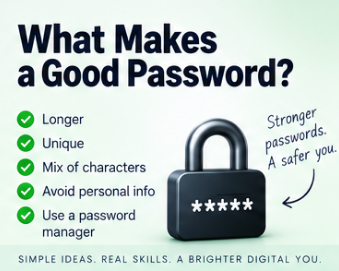
Pull all of this together and a good password is long, unique to that one account, unpredictable rather than a dressed-up common word, checked against lists of previously breached passwords, and manageable enough that you're not driven to insecure workarounds just to cope with it. A passphrase or a password manager can carry most of that weight for you without demanding much effort in return.
A better set of questions to ask yourself
Rather than "does it have a capital letter," ask whether it's actually long. Rather than "does it have an exclamation mark," ask whether it's genuinely predictable. Rather than "have I changed it this month," ask whether there's any evidence it's been compromised. And rather than "can I remember one clever password for everything," ask whether every account actually has its own. Those four questions map far more closely onto how password security really works than any checklist of required character types ever did.
The important part
A password's job is to help prove you are who you say you are, and looking complicated is not the same thing as being strong. Something like P@ssw0rd1! ticks every box on the traditional checklist, uppercase, lowercase, number, symbol, and remains a genuinely terrible password, because attackers already know that exact pattern by heart. Real password security rests on length, unpredictability, uniqueness, being stored properly on the website's end, resistance to repeated guessing, and additional authentication layered on top where it's available. You have a responsibility to pick something strong and unique. The service has a responsibility to store it properly. Neither side fully makes up for the other one doing a bad job.
Further reading
NIST's Digital Identity Guidelines, published by the US National Institute of Standards and Technology as Special Publication 800-63B, are genuinely worth a look if you want the source behind modern password advice. It's the document most directly responsible for the shift away from forced complexity rules and routine password expiry described above.
Security Engineering, by Ross Anderson, goes well beyond passwords into authentication, protocols, human behaviour, and the many ways security mechanisms fail once they meet real people using them in the real world.
The Art of Deception, by Kevin Mitnick and William L. Simon, tackles security from the human side rather than the technical one, and makes an uncomfortable point rather well: an extraordinarily strong password stops mattering the moment someone simply persuades you to hand it over.
And Verizon's annual Data Breach Investigations Report, freely available online, is worth a skim if you want to see, in genuinely large numbers gathered from thousands of real incidents each year, just how much of modern cybercrime still comes down to somebody's password.
📝 Article
Phishing: Five Warning Signs
By Dave Milliken
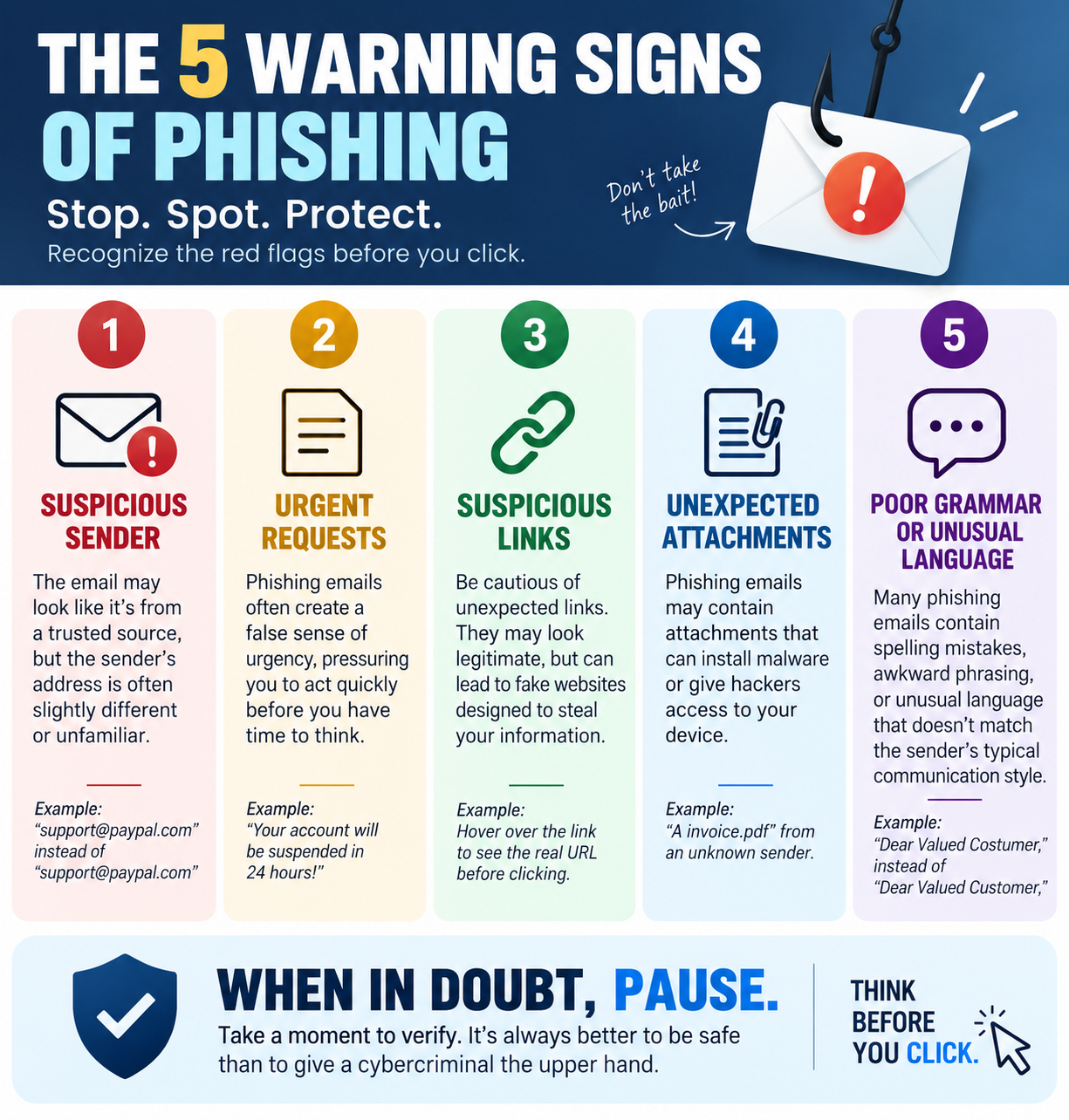
Say the word "phishing" to most people and they picture a badly written email from a mysterious prince offering several million pounds if you'll just send your bank details first. That version still exists, somewhere, but modern phishing has moved on considerably. It can arrive by email, text, social media, messaging apps, a phone call, an online advert, a QR code, a fake website, even an innocent-looking online quiz. The delivery method keeps changing. The underlying goal never really does: someone is trying to manipulate you into handing over something they shouldn't have, a password, bank details, a security code, money, access to your computer, or answers to security questions you'd forgotten you'd ever shared. Sometimes they want a click. Sometimes an install. Sometimes just a sentence typed into a reply. Here are five warning signs worth actually recognising, rather than the "bad spelling" test everyone learned a decade ago and never updated.
One: they want you to act before you have time to think
Urgency is one of the most reliable tools in a scammer's kit. Your account will be closed today. Payment is required immediately. Your parcel cannot be delivered. Suspicious activity has been detected. You have 30 minutes to confirm your details. The rush is the point, not a side effect of it: the moment you have time to stop, check the sender, visit the organisation's real website, or ask someone else what they think, the whole thing tends to fall apart. So phishing leans hard on provoking an emotional reaction, fear, panic, excitement, curiosity, greed, embarrassment, it genuinely doesn't matter which one, as long as it gets you responding before you've properly looked at what's actually happening.
A decent working rule: the more urgently somebody wants you to act, the more deliberately you should slow down. That doesn't mean every urgent message is fake, banks really do catch fraud, accounts really do get locked, parcels really do go missing, but urgency should trigger verification, never blind obedience. If your bank apparently contacts you about a problem, don't use the phone number or link sitting right there in the message. Use a number or address you already know is genuine.
Two: the sender is not quite who they appear to be
Phishing runs heavily on impersonation, your bank, your employer, Microsoft, Amazon, HMRC, a delivery firm, a friend, your own manager. The key phrase there is "appear to be." A message might display Amazon Customer Service as the name while the actual address behind it is something entirely unrelated. Attackers also lean on addresses that look almost right at a glance, microsoft.com becomes micros0ft.com with a zero standing in for the o, or a long address buries the genuine company name somewhere inside it purely for reassurance, while the part that actually matters, the domain that owns the address, is something else entirely.
Most email programs let you dig a little deeper if you look for an option like "show details," "view source," or "view headers," which can reveal where a message really originated and where a reply would actually go. You don't need to become a forensics expert, simply comparing the display name against the actual address catches a surprising amount on its own, and the Reply-To field is worth a specific glance, since a message can appear to come from one address while quietly routing any reply somewhere completely different. One important caveat, though: a believable sender address doesn't guarantee anything either. Addresses can be spoofed, and real accounts do get compromised. Sender information is evidence. It's not proof.
Three: the link does not take you where you think it does
A phishing message very often needs to move you somewhere the attacker controls, usually a convincing fake login page. The visible text might read "Review your Microsoft account" while the actual link underneath points somewhere else entirely. On a computer, hovering over a link before clicking it will usually reveal where it really goes. On a phone, pressing and holding often does the same job. Look specifically at the domain: https://login.microsoftonline.com/ and https://microsoft-login.example.com/ are not the same thing at all, even though the second one contains the word "microsoft" purely to reassure you.
Shortened links, redirects, buttons standing in for visible URLs, and look-alike characters all make this harder to spot at a glance, and QR codes deserve special caution for exactly this reason, a QR code is essentially a link you cannot inspect with your eyes before committing to it. An official-looking letter, poster, or document doesn't make whatever's behind the code trustworthy. The same caution applies to unexpected attachments, an invoice, a payslip, a delivery notice, a "shared document," especially when the message is also pushing you to open it immediately. The genuinely safest habit with an unexpected message is to skip the supplied link or attachment entirely. If Amazon supposedly needs something from you, open the Amazon app yourself. If it's your bank, use the number on the actual card in your wallet. Go to the organisation independently, on your own terms, every time.
Four: they are asking for something they should not need
Sometimes the clearest warning sign is simply the request itself. A legitimate organisation shouldn't need your password emailed to them. Your bank shouldn't need your full security information read aloud over the phone. Your own IT department shouldn't need your password to "fix" something on your account. Be suspicious of anyone asking for passwords, PINs, one-time codes, full card details, recovery codes, security-question answers, remote access to your machine, or unusual payment methods like gift cards or cryptocurrency.
One-time codes deserve particular attention. If you receive a message saying "your security code is 482193, do not share this with anyone," and shortly afterwards someone calls claiming to be from that same company asking you to "just read me the code we sent you," they may well be trying to log into your account using your own password, with that code standing as the only thing left in their way. If someone ever asks you to bypass, disable, or simply hand over a security control, treat the request itself as the warning sign, regardless of how they explain it.
And knowing things about you doesn't make someone legitimate either. An attacker might already know your name, employer, phone number, address, bank, job title, or the names of people in your family, some of it from social media, some from old data breaches, some just sitting in public records. Familiarity can make a scam far more convincing. It proves nothing about who's actually contacting you.
Five: they are collecting information that seems harmless
This one's subtler. You're scrolling social media and see one of those "how many points can you score" posts: a point if you were born before 1980, a point if your first car was a Ford, a point if you went to primary school in your home town, a point if you had a childhood pet, a point if your mother's maiden name starts with M. Harmless fun, on the face of it. Except first car, first school, first pet, and mother's maiden name have all, historically, doubled as security questions. The same problem hides inside "your superhero name is your first pet plus the street you grew up on" and every variation on that theme. Funny, maybe. Also, quite possibly, two genuine pieces of personal information broadcast in public for anyone paying attention.
None of these individual pieces needs to be an enormous secret on its own. Facebook reveals a first pet, LinkedIn reveals an employer and job title, a birthday post reveals a date of birth, an old school photo reveals which school, a public directory reveals an address. Individually, harmless-looking scraps. Assembled, a genuinely useful profile, and one that turns a generic "Dear Customer" into something considerably sharper: "Hello Dave, we're contacting you about your account following your recent work with Example Organisation." The more an attacker already knows, the more convincing everything that follows becomes. So before filling in a quiz, survey, or social-media challenge, it's worth asking who actually needs this answer, and more importantly, who you're actually handing it to.
Phishing doesn't always go for the prize on the first message
This matters more than people expect. The opening message often isn't asking for anything valuable at all, it's just building trust for what comes next. "Hello, is this Dave?" Then, "I'm trying to reach you about your organisation." Then, "could you confirm your work email?" Then, "thanks, I've sent over a document." Each individual step looks entirely harmless in isolation. Treated as a single sequence, it's a slow walk toward the actual objective, which is exactly why phishing is better understood as a process than as one obviously suspicious message. This pattern is common enough, and expensive enough, that regulators track it separately: business email compromise, essentially this exact slow-build impersonation technique aimed at getting someone to authorise a payment or hand over access, accounted for just over three billion dollars in reported losses in the US alone in a single recent year, and it typically involves no malicious link or attachment at all, just a convincing message and someone acting on trust.
What to actually do when something feels off
The safest response is almost always to verify through a route the message itself didn't give you. Open the official app yourself. Type the website address in rather than clicking through. Use a phone number you already trust, not one printed in the suspicious message. Contact the person through a completely different channel, or ask them face to face. Suppose an email lands claiming to be from your manager: "I'm in a meeting, I need you to urgently buy £500 of gift cards." Don't reply to that message asking "is this really you?" If an attacker controls or has spoofed that channel, they will simply say yes. Phone your manager instead. Message them on a platform you know is really theirs. Verification only works when you step outside the channel that might already be compromised.
Two things that no longer tell you anything useful
Poor spelling and grammar used to be one of the classic tells, and genuinely clumsy messages, "Dear Costumer, your acccount has been suspending, kindly click hear immediately," do still turn up and are still worth noticing. But good spelling proves precisely nothing any more. Translation tools, professional templates, copied genuine emails, and generative AI mean a phishing message can now be flawlessly written, correctly branded, and pitch-perfect in tone. Absence of typos is not evidence of legitimacy.
And be wary of anything that seems too good to be true. Congratulations, you've won £10,000, a new iPhone, a luxury holiday, a voucher for a competition you don't remember entering, and all you need to do is click here, complete a short survey, or pay a small delivery fee to release it. A useful question in that exact moment is simply "why me?" If you didn't enter, why would you win? If a phone is being given away for three quiz answers, why? Extraordinary offers deserve extraordinary scepticism, not extra excitement.
If you've already clicked
People click phishing links. People type passwords into convincing fake pages. People answer calls they shouldn't have. None of that means the moment has passed for doing something about it. Change the password immediately, and change it anywhere else you'd reused it too. If banking details were involved, contact your bank directly. If you installed something you shouldn't have, get technical help and have the device scanned properly. If it touched a work account or device, tell your organisation's IT or security team straight away. Trying to quietly hide a mistake like this just buys the attacker more time to use whatever they got. Reporting it quickly is usually the single most effective thing you can do after the fact.
Five questions worth keeping in your head
When something feels slightly off, run through five quick questions: Urgency, are they trying to stop me thinking? Identity, are they actually who they claim to be? Destination, where does this link, attachment, or QR code genuinely lead? Request, why do they need this information, code, payment, or access in the first place? And Information, am I about to reveal something personal that could be useful to someone later on? No single one of these proves anything on its own, and a sufficiently careful scam might dodge two or three of them, but together they force the one thing phishing depends on you not doing: thinking before acting.
The important part
Phishing isn't really a technology problem, it's a people problem that technology happens to make easier to scale. Email, social media, messaging apps, SMS, QR codes, fake websites, AI-written messages, phone calls, all just delivery mechanisms for the same underlying sequence: get attention, create an emotion, establish some trust, push for action, then extract information, money, or access. Technology keeps changing shape. Human psychology changes far more slowly than any of it. Which is exactly why the single most effective anti-phishing tool most people will ever use isn't a piece of software at all. It's a habit: stop, check, verify independently, then act.
Further reading
The UK's National Cyber Security Centre publishes practical, regularly updated guidance on recognising, reporting, and responding to suspicious emails, texts, calls, websites, and adverts, worth bookmarking specifically because phishing techniques shift constantly and this kind of guidance tends to keep pace with them.
The Art of Deception, by Kevin Mitnick and William L. Simon, looks at social engineering rather than the purely technical side of attacks, and makes the point that matters most here: the easiest way into a secure system is often not attacking the system at all, but persuading a person to simply open the door.
Social Engineering: The Science of Human Hacking, by Christopher Hadnagy, digs into the psychology, communication techniques, and information-gathering behind social engineering specifically. Understanding how people get influenced is arguably just as valuable as understanding whatever technology happens to be carrying the attack that day.
💼 Vacancy
Junior Implementation Consultant
Salary:
£35000.00 - £45000 per annum
Closing Date:
30 September 2026
As a Junior Implementation Consultant, you'll work alongside experienced consultants to help customers successfully implement and adopt the company's software.
You'll get involved across the implementation lifecycle, helping understand customer requirements, configure the platform, work with data, test solutions and support customers through training and go-live.
You'll take on responsibility early on for your own customers and implementation projects.
What You'll Be Doing
Supporting the delivery of software implementations for customers
Helping gather and document customer requirements
Configuring software and workflows around customer needs
Working with customer data, including mapping, checking and validating information
Supporting data migration and system configuration
Testing solutions ahead of customer go-live
Helping run customer workshops and implementation sessions
Supporting customer training and product adoption
Working alongside Product, Engineering and other internal teams
Using tools such as Excel, SQL, Power BI, Alteryx or Power Automate
Troubleshooting issues and helping customers resolve problems
Learning how to manage software implementations from discovery through to go-live
About You
You don't need to have years of implementation experience. This could suit someone coming from software, technology, data, professional services or another client-facing environment who wants to build a career in technology consulting.
Ideally, you'll bring:
Some experience working with software, technology or data
Strong Excel skills and confidence working with data
Exposure to SQL, Power BI, Alteryx, Power Automate or similar tools would be useful
Good analytical and problem-solving skills
Confidence communicating with customers and colleagues
The ability to understand business problems and think through solutions
Strong attention to detail and organisation
A genuine interest in technology and learning new systems